Imagine a mental model
The concept of creating a 3D illusion on a flat screen is a fascinating subject. The underlying mechanics involve a blend of geometry and perception that many conceptual thinkers explore online. The following perspective examines how this transformation from three-dimensional data to a two-dimensional surface is achieved.

First of all, we need to imagine some space. Let's make a finger frame like photographers and camera operators do: place the thumbs and index fingers of both hands together to form a rectangle and look at the world through it. You already have a projection, but it's too early to speak about that. Instead, let's focus on the abstract figure formed in space. It's called a rectangular frustum. It is made of the near plane (your finger frame), plus far, left, right, bottom, and top planes that cut the space.
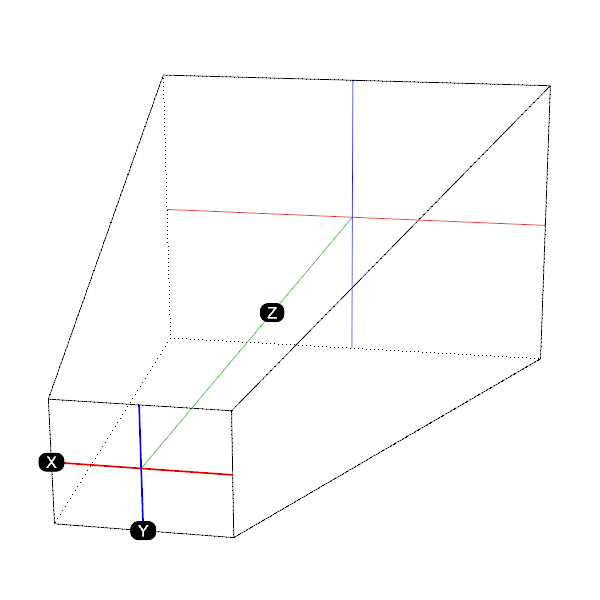
A rectangular frustum (which wraps our space) is a truncated pyramid with rectangular bases, lying on its side while we look inside from the truncated top. This is an abstraction that can be described mathematically very well. Every single point placed inside will have a specific XYZ coordinate value.
Let's agree that the Z-axis goes from the truncated top (the near plane formed by your fingers) to the far plane (deep inside the space). So, the Z-coordinate will hold the depth value of any point in our space.
This is how the primary mathematical 3D space is defined in a 3D graphics engine. The frustum figure acts as a clipping space. Anything outside of its boundaries is not used in calculations. It knows the XY parameters and Z-depth for every vertex of a 3D mesh object. Since the basic topological primitive that defines a plane is a triangle, the vertices of a 3D object are grouped by threes and projected onto the screen plane. The Z-depth parameter makes it possible to recognize when triangles overlap or overlay one another, determining which ones will be drawn and which will stay hidden.
In short, a 3D graphics engine is a state machine to which you pass 3D mesh data (at a minimum: vertices and indices). The engine instructs the GPU on how to apply transformation matrices for movement and rotation, as well as how to project those objects onto the near plane of the frustum, using model, view, and projection matrices. Then rasterization happens, converting those triangles into a pixel-based image for your screen. This rendering process runs in cycles, matching your screen's frames-per-second (FPS) rate.